
GUI Image
And now let's talk about the game. This is the first screenshot published with the GUI.
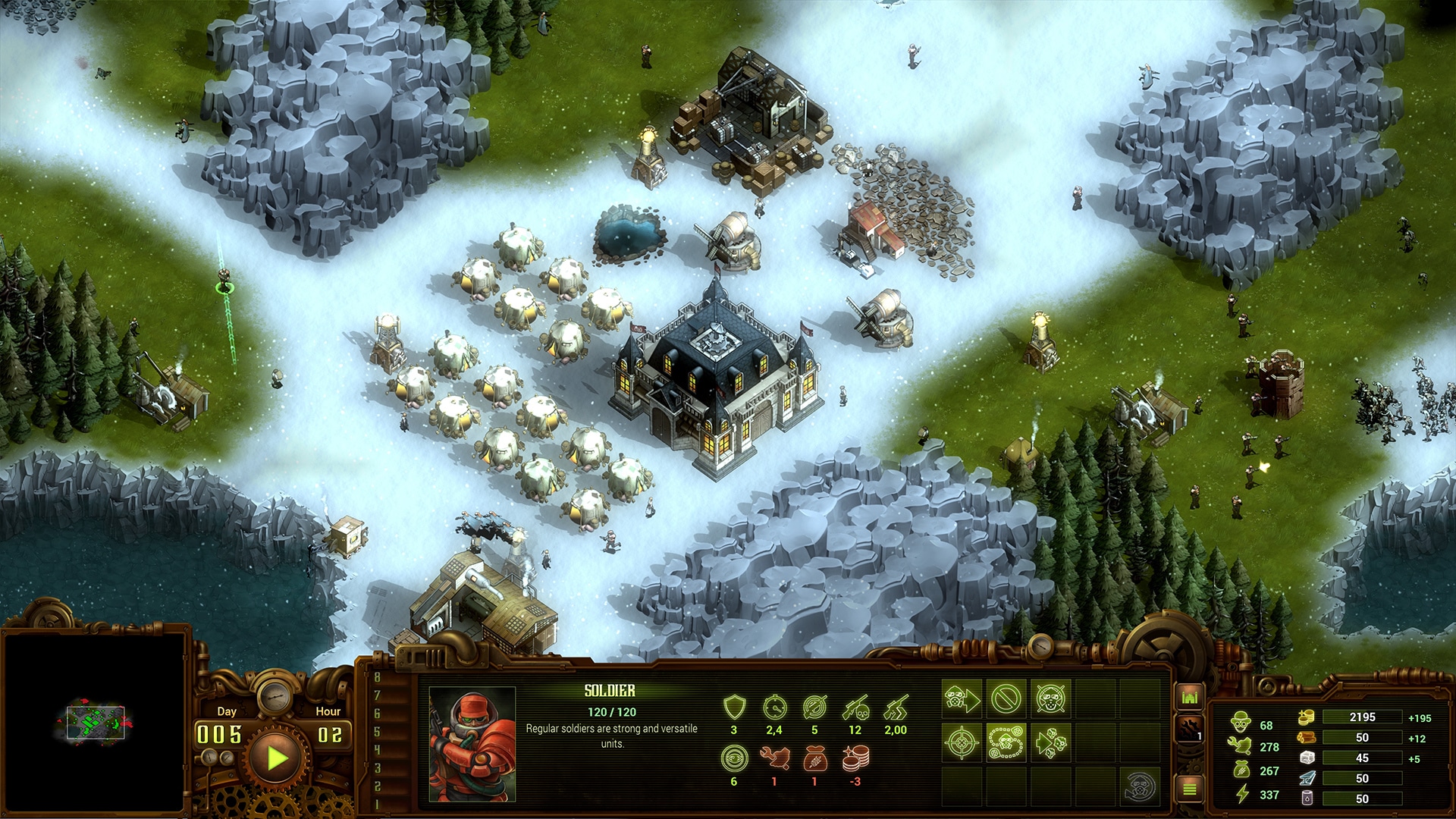 As we have played a lot :), we have reworked the GUI several times to have the most useful one. It is similar to other RTS, so if you have played others before you will be very comfortable with this setup. There is a minimap that shows you the land explored; your colony in green and the enemies in red. Enemies only appear if they are being watched by buildings or units.
Next, there is the Pause/Play button. This feature is very important in managing your colony, allowing you to build calmly and strategically at your own pace. Also on the interface, you will notice the day and hour of the colony. 1 minute of real time is 1 day in the game. For example, in the Survival Mode, you just have to survive for 100 days. We will talk more about Survival Mode later.
Next, you will see the main area that displays the units or buildings selected with their properties, attributes, and commands available. This screen changes depending on what you have selected. All commands to build structures is done at the Command Center which is the main building of the colony. If the Command Center falls to the infection or is destroyed, it is game over.
And finally, to the right, you will see the status of the colony. This shows how much food, workers, energy, and colonists are available to be used. It also shows the storage of resources needed to build structures and units. These resources are continuously collected by the colonistswhich include: wood, stone, iron, and oil. It shows your current stock, the storage used, and the production on the right.
And that's all for today! In the next post, we will continue talking more about the gameplay.
See you soon!
As we have played a lot :), we have reworked the GUI several times to have the most useful one. It is similar to other RTS, so if you have played others before you will be very comfortable with this setup. There is a minimap that shows you the land explored; your colony in green and the enemies in red. Enemies only appear if they are being watched by buildings or units.
Next, there is the Pause/Play button. This feature is very important in managing your colony, allowing you to build calmly and strategically at your own pace. Also on the interface, you will notice the day and hour of the colony. 1 minute of real time is 1 day in the game. For example, in the Survival Mode, you just have to survive for 100 days. We will talk more about Survival Mode later.
Next, you will see the main area that displays the units or buildings selected with their properties, attributes, and commands available. This screen changes depending on what you have selected. All commands to build structures is done at the Command Center which is the main building of the colony. If the Command Center falls to the infection or is destroyed, it is game over.
And finally, to the right, you will see the status of the colony. This shows how much food, workers, energy, and colonists are available to be used. It also shows the storage of resources needed to build structures and units. These resources are continuously collected by the colonistswhich include: wood, stone, iron, and oil. It shows your current stock, the storage used, and the production on the right.
And that's all for today! In the next post, we will continue talking more about the gameplay.
See you soon!